"App Not Installed"? Every Reason a MOD APK Fails to Install on Android, and the Fix for Each
Signature conflicts, Samsung Auto Blocker, Play Protect's enhanced fraud protection, v7a/v8a mix-ups, truncated downloads, Android 14's old-app block — eleven causes of "App not installed", each with the exact fix, plus what the September 2026 developer-verification change means for APKs.

"App not installed." Three words, no reason given, and the MOD APK you just downloaded is sitting in your Downloads folder doing nothing. Android has a dozen different reasons for refusing an install, and the dialog almost never tells you which one you hit. This guide goes through every cause we see in the support mail for MODKICK listings, in the order they are most likely, with the exact fix for each — including the two newer blockers that catch most people in 2026: Samsung's Auto Blocker and Google Play Protect's enhanced fraud protection.
Before you start, two facts that save time. First, the error text matters: "App not installed as package appears to be invalid", "App not installed as app isn't compatible with your phone" and "blocked by Play Protect" are three different problems. Second, the fix is almost never "download it again from another site" — in most cases the file is fine and the phone is the one saying no.
Read the exact message first
| What the phone says | Most likely cause | Jump to |
|---|---|---|
| App not installed (no reason) | Original app or an older/different mod still installed; or not enough storage | Causes 1 and 9 |
| App not installed as package appears to be invalid | Incomplete download; or a very old build on Android 14+ | Causes 5 and 8 |
| App not installed as app isn't compatible with your phone | Wrong CPU architecture (v7a / v8a) or Android version too low | Causes 6 and 7 |
| For your security, your phone is not allowed to install unknown apps from this source | "Install unknown apps" is off for the app you opened the file from | Cause 2 |
| Auto Blocker blocked this installation | Samsung One UI 6 or newer | Cause 3 |
| Blocked by Play Protect / This app was blocked for your protection | Play Protect scan or enhanced fraud protection | Cause 4 |
| There was a problem parsing the package | Corrupted file, or an XAPK/APKS opened as a plain APK | Causes 5 and 10 |

Cause 1: the original app (or another mod) is still installed
This is the number-one reason, and it has nothing to do with the file. Every Android app is signed, and a MOD APK is signed with a different key than the Google Play version. Android will not install a package with the same name but a different signature over an existing one — and instead of saying "signature mismatch" it just says "App not installed". The same thing happens when a mod from another site, signed by a different modder, is already on the phone, and when you try to install an older version over a newer one.
Fix: uninstall the existing copy first. If the game has cloud saves tied to an account (Google Play Games, Facebook, the game's own account), sign in and sync before you uninstall; local-only progress is lost, which is why every MODKICK listing says so in its install section. For example Subway SurfersView
will not install while the Play Store Subway Surfers is on the phone — remove that one, then install the MOD.
Cause 2: "Install unknown apps" is off for the app you are using
Since Android 8.0 the permission to install APKs is granted per app, not globally. If you opened the file from Chrome, Chrome needs the permission; if you opened it from your file manager or Telegram, that app needs it. The phone usually shows a dialog with a Settings button — but on some brands it silently fails.
Fix: Settings → Apps → Special app access → Install unknown apps → pick the app you are opening the APK from → allow. On Samsung the path is Settings → Security and privacy → Install unknown apps (sometimes under "More security settings"). Then open the APK again from that same app.

Cause 3: Samsung Auto Blocker (One UI 6 and newer)
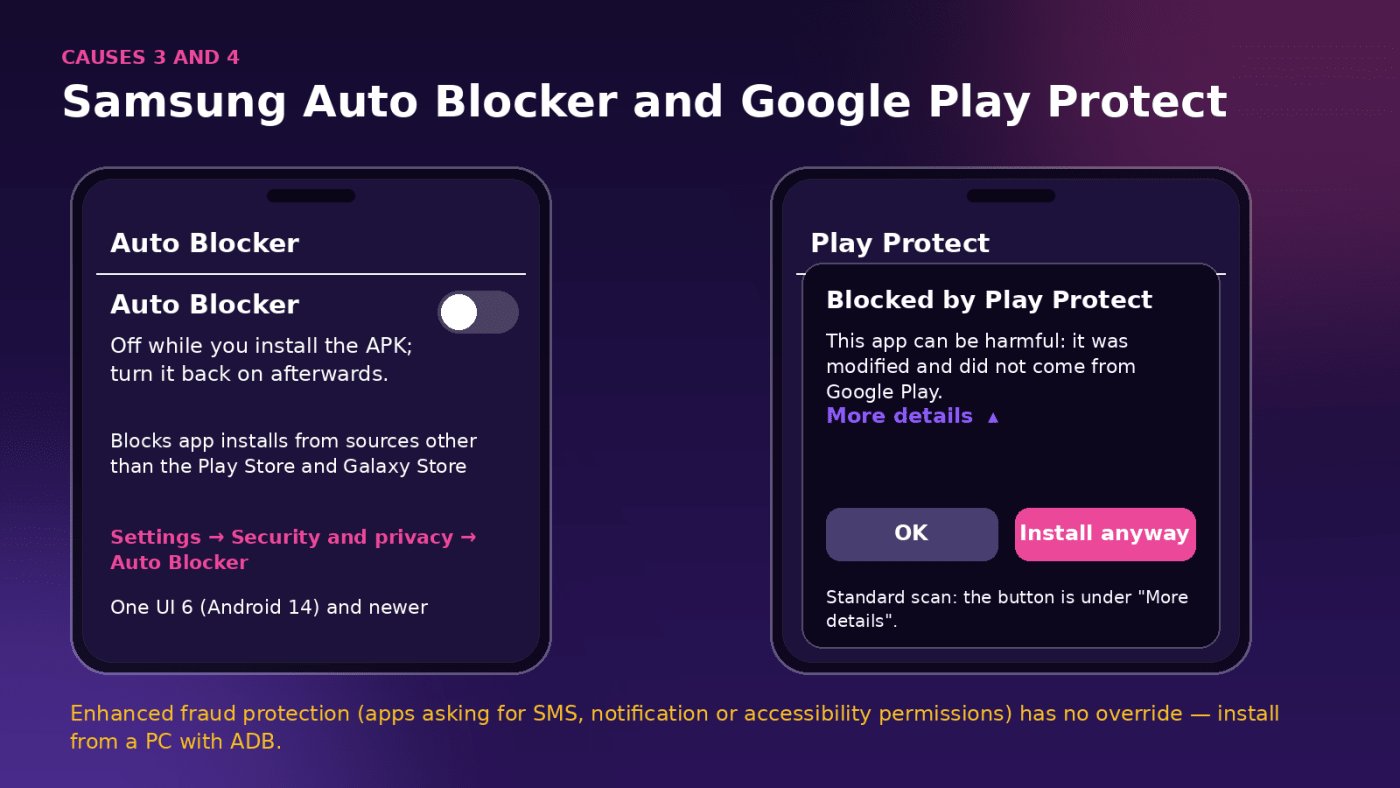
Galaxy phones that shipped with or updated to One UI 6 (Android 14) have Auto Blocker, and on new devices it is on by default. Among other things it blocks app installs from any source other than the Play Store and Galaxy Store — so every APK, modded or not, fails, usually with a short "Auto Blocker" notification rather than the normal Android dialog.
Fix: Settings → Security and privacy → Auto Blocker → turn it off, install the APK, and turn it back on if you want the other protections (USB command blocking, message attachment checks). Auto Blocker does not need to stay off for the app to keep working; it only checks at install time.
Cause 4: Google Play Protect
There are two different Play Protect blocks and they look similar.
The standard scan shows "Blocked by Play Protect" or a warning that the app "may be harmful" because it is an unknown, modified package. Tap More details and then Install anyway — the option is there, just hidden under the expander. If you want to stop the prompt for a while: Play Store → your profile picture → Play Protect → settings (gear) → turn off Scan apps with Play Protect, install, then turn it back on.
Enhanced fraud protection is different. Google rolled it out to 185 markets during 2025, and it automatically blocks an app installed from an "Internet-sideloading source" — a browser, a messaging app, a file manager — when that app requests permissions that are abused for financial fraud: reading or receiving SMS, notification access, accessibility services. There is no Install anyway button. Games practically never request those permissions, so this rarely hits game mods; it can hit communication and utility apps that legitimately use SMS or notification access, such as a caller-ID app. The documented route around it is to install from a computer with ADB (adb install file.apk), which is not an internet-sideloading source.
Cause 5: the download is incomplete or corrupted
A file that stopped at 180 MB of 257 MB will "parse" badly and produce "package appears to be invalid" or a parsing error. Mobile browsers are bad at telling you a download was cut; Chrome in particular will happily show "Download complete" for a truncated file after a network switch.
Fix: compare the file size in your file manager with the size on the listing — every MODKICK page prints it next to the version. If it does not match, delete the file and download again on a stable connection, ideally Wi-Fi, and avoid downloading two large files at once. Do not "repair" an APK by renaming it.
Cause 6: wrong CPU architecture (armeabi-v7a vs arm64-v8a)
Some mods are published as two files: a v8a build for 64-bit phones and a v7a build for older 32-bit ones. Install the wrong one and you get "App not installed as app isn't compatible with your phone". Any phone from roughly 2017 onwards is 64-bit and wants v8a; v7a exists for budget devices from before that and for some emulators. When a MODKICK listing offers both, the download page labels them.
Fix: if you are not sure which CPU you have, a free device-info app (CPU-Z, AIDA64, DevCheck) shows the ABI under "System" — arm64-v8a means pick v8a.

Cause 7: your Android version is below the minimum
Every APK declares the lowest Android it runs on. Current builds of big games want Android 7.0 or 8.0; Podcast-style apps went to 8.0 this year. Installing on anything lower fails with the "isn't compatible" message, and there is no toggle for this.
Fix: check the "Android" line in the requirements table of the listing before downloading. If your device is too old, an archived older build is the only option, and we only link those when the source still carries them.
Cause 8: Android 14 refuses very old builds
Android 14 stopped installing apps that target Android 5.1 or lower (target SDK 22 or below) — a security measure against old malware. The symptom is "App not installed as package appears to be invalid" even though the file is complete. This only affects mods built from apps that have not been updated since about 2015, which includes a lot of abandoned "classic" games floating around.
Fix: on the phone there is none. From a computer, ADB can force it: adb install --bypass-low-target-sdk-block file.apk. Everything MODKICK currently lists targets a recent SDK, so you should not meet this with our builds.
Cause 9: not enough storage
Android needs room for the APK and the extracted app, so a large single-file game needs roughly twice its size free during installation. Plants vs Zombies 2View
is a 940 MB APK — plan on about 2 GB free. Phones with an SD card still install to internal storage, so free space on the card does not count. The failure is usually a plain "App not installed" with no hint.
Fix: clear the Downloads folder of old APKs, move photos and videos, and retry. Deleting the downloaded APK after a successful install is fine; the app does not need it anymore.
Cause 10: it is an XAPK, APKS or APKM, not an APK
Split packages bundle several APK files (and sometimes an OBB) in one archive. Opening one with the normal installer gives a parsing error. MODKICK links single APKs whenever the source offers them and says so in the requirements table when a build needs an OBB.
Fix: install split packages with an installer app (SAI – Split APKs Installer, or APKMirror Installer), or rename .xapk to .zip, extract it, and install the inner APKs together. If an OBB is included, read our OBB guide for Android 14 and 15.
Cause 11: a leftover from an uninstalled app
Occasionally an app is gone from the launcher but Android still has the package registered — usually after a failed update, or because it was installed for a second user or work profile. The install then fails as in cause 1 even though you "already uninstalled it".
Fix: Settings → Apps → show all apps (and check All users or the work profile if your phone has one) → find the app → uninstall for all users. On Android 10 and newer, Settings → Apps → See all apps → menu → Show system can reveal the ghost entry.
Brazil, Indonesia, Singapore, Thailand: the developer-verification change
Since 30 September 2026, certified Android phones in these four countries only install apps from developers verified by Google — but, as of late October 2026, that check applies to installs through the participating app stores (Google Play, Galaxy Store, Xiaomi GetApps, HONOR, OPPO, vivo and Palm Store). Direct APK downloads are not covered yet, and Google has said the "advanced flow" for unverified apps is not needed for now. If that changes, the known routes are Google's advanced flow in Developer options, ADB from a computer, or Shizuku. We will update this section when the enforcement widens; a global rollout is planned for 2027.
Still stuck? The two-minute checklist
- Uninstall any existing copy of the app (Play Store version or an older mod) — cause 1.
- Check the file size against the listing — cause 5.
- Allow "Install unknown apps" for the app you are opening the file from — cause 2.
- On Samsung, switch off Auto Blocker — cause 3.
- Tap More details → Install anyway on the Play Protect prompt — cause 4.
- Free up about twice the APK size — cause 9.
- Check the Android version and the v7a/v8a label — causes 6 and 7.
If the install succeeds but the app crashes on launch, that is a different problem: usually an online check in a game that requires a server, or an architecture mismatch that slipped through. Our general install guide covers the normal happy path, and every listing's install section notes anything specific to that build.
Frequently asked questions
Why does the MOD APK say "App not installed" when the original game is not on my phone?
Most often an older mod of the same game is still installed, or the file did not finish downloading. Check Settings → Apps for the package, then compare the file size with the listing.
Can I install a MOD APK without uninstalling the original?
No. Both packages have the same name and different signatures, and Android keeps exactly one. Back up or sync your progress, uninstall the original, then install the mod.
Does turning off Play Protect make the install work?
For the standard scan, yes — but you can also just tap More details → Install anyway without turning anything off. For enhanced fraud protection, which has no override and only triggers on apps requesting SMS, notification or accessibility permissions, the route is ADB from a computer.
Is "App not installed" a sign the APK contains a virus?
No. The message is Android's generic refusal and is produced by signature conflicts, storage, architecture and version checks. Play Protect uses different wording when it flags a file.
Keep reading
 Guide
GuideHow to Install OBB Files on Android 14 and 15 Without Root (When Android/obb Says "Access Denied")
Since the March 2024 security patch, no file manager can write to Android/obb on Android 11 or newer — the "Use this folder" trick is dead. What changed, when you do not need an OBB, and three methods that work on Android 14, 15 and 16: a PC over USB, Shizuku with ZArchiver, or an installer app.
 Guide
GuideBest Offline MOD APK Games for Android in 2026 (No Internet Needed)
Eleven MOD APK games from our catalogue that play their core mode in airplane mode — Subway Surfers, Hill Climb Racing, Plants vs. Zombies 2, Traffic Rider, DEAD TARGET and more — with what each mod really changes, file size, minimum Android version and the parts that still need a connection.